| Blog | Technical Writer | Technical Analyst | Business Analyst | Admin Support | Projects | Sample Documents | Home |
Part 3 – All Good Things…
Here we are at the end of our tale.
Now that I had my server updated with all the packages needed, opened the ports I needed and rebooted, I now logged onto the server using Putty.
In the host name field, enter the IP address for my Ubuntu Server. Ensure the port is 22 and SSH is selected. Clicked Open. Next step log into server.

If it’s the first time you’ve logged in it will prompt you to accept for the server’s key fingerprint. I set up the server, so I said yes.
Log into the server. Username and password.
I downloaded the Collector install file from my Auvik site to my Windows workstation and uploaded it to the Ubuntu server using Putty. Here is an article about the Windows to Ubuntu transfer (that I did not write). https://www.systranbox.com/how-to-transfer-file-from-windows-to-linux-using-putty/
So to install the Collector, I needed my Auvik email which is the email for my Auvik site and my API key. (And I’ll tell you a story about that.) I also needed the domain prefix for my Auvik site.
I don’t use a proxy on it, so I can skip that step.
sudo bash -c "rm -rf ./auvik_installer install.sh && umask 0022 && curl --verbose --location-trusted --header \"Accept: text/plain\" --user [email address] https://[domain prefix].my.auvik.com/agents/installer > install.sh && grep -wq __ARCHIVE_BELOW__ install.sh && chmod 0755 install.sh && bash -x ./install.sh 2>&1 | tee /tmp/install.log"So the [email address] is my Auvik email address and [domain prefix] is the site name I chose for my Auvik site. It then asked me; as expected; for the password for the email address. Here is where my story gets told. The API key is the password that the installation is looking for.
Remember how I said at the beginning that I had gotten discouraged and just installed my collector to a Windows server? I thought I’d written down my API key. Notice I said thought. So I did these steps and it didn’t work. I figured I input the API key wrong. Tried it again. Still nope.
And again… and again… and again.
Nope. So I got a screenshot of the text it printed and sent it to my work email and walked away for the night. The next day I went to my buddy Lawrence on the Sales Engineering team who happens to be amazing at everything Auvik and asked him to take a look. (Begged really.)
I had images of failing again like I had the first time. He says, “Cool. Easy one. Wrong API key.”
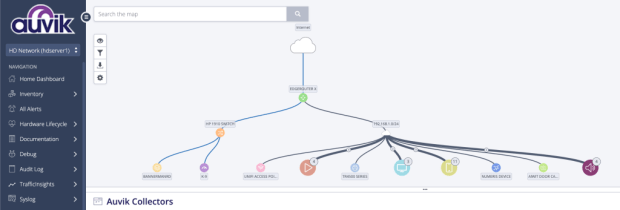
So on his advise, I got a new API key – I must have lost the original or mistyped it when I saved it. Boom, up came my Auvik site as it started to build the map.
That’s the three article epic of me, the technical writer, installing the Auvik Collector on an Ubuntu server.
Now that one interesting thing I learned about one of the devices I have on my network. Now most of the things I have are pretty normal… PCs, Laptops and Printers. A tonne of Roku TVs and gaming machines.
The interesting one – our video doorbell. That doesn’t sound interesting, I know, but I am a nerd. What I find interesting about it is that the Auvik network exposed that it isn’t connected all the time. In fact when you ring the doorbell, then it connects to the network and my phone.
I did say I was a nerd.
 Tammy J. Morrison - Writer & IT Guru